Native SharePoint forms inside your tenant — one flat license, no Power Apps fees.
FormCraft 365 is a visual designer and runtime renderer for custom list forms. It runs as native SPFx inside the SharePoint page, stores its configuration in your own SiteAssets library, and ships as a single package for every list in the tenant.
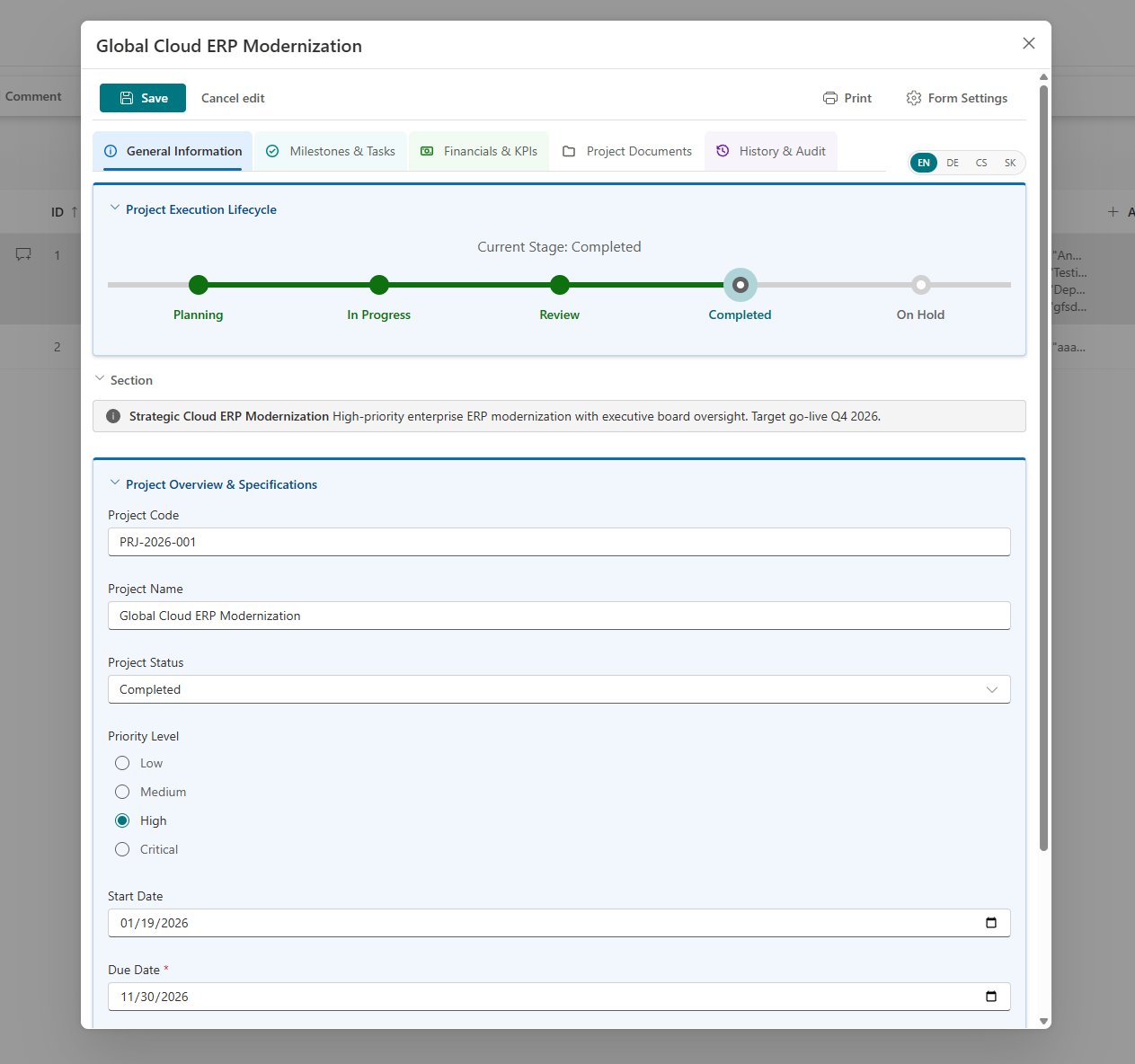
Why teams move to FormCraft 365
Built for SharePoint administrators and M365 architects replacing Power Apps list forms, DFFS or InfoPath.
Your tenant only
Form configuration is a file in SiteAssets/FormCustomizer, protected by SharePoint permissions and a Storage Lock. The license key is verified in the browser with no network call.
Native SPFx performance
The form renders directly inside the SharePoint page. The item loads in parallel with the configuration, and only the active language is downloaded.
One package, every form
Upload one .sppkg to the App Catalog and enable it for all sites. Each list keeps its own configuration. There are no per-user or per-app fees.
AI Assistant with guardrails
Builds a prompt for Microsoft 365 Copilot, ChatGPT or Claude from column names, types and settings, never item data. The response is schema-checked, summarized before → after, and applied as one Undo step.
Forms never stop
License limits apply only in the designer. A missing, expired or unreadable key never crashes a form and never blocks users from saving.
See it in SharePoint
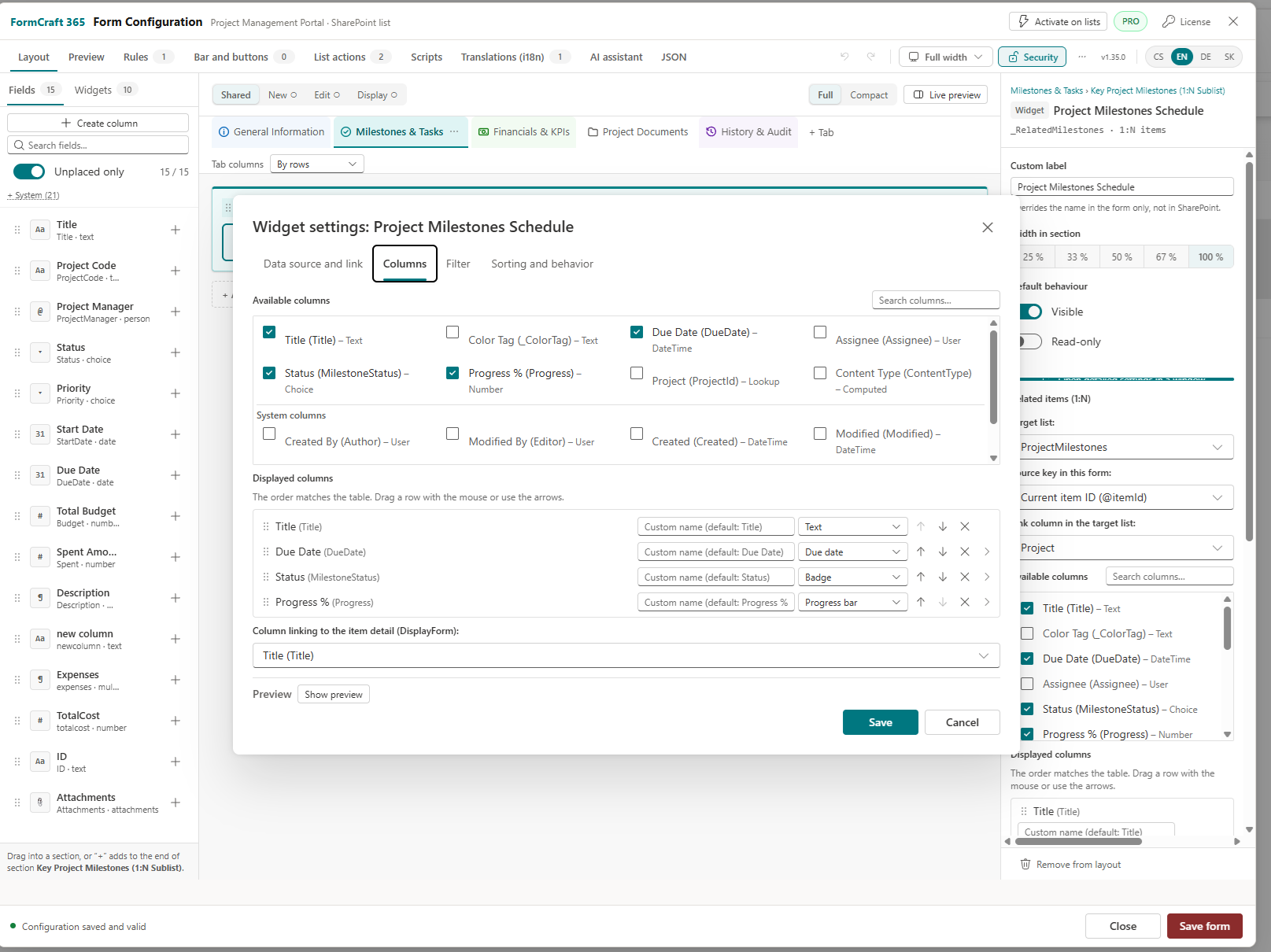
What you can build
Everything below is configured in the designer and saved as one JSON file per list.
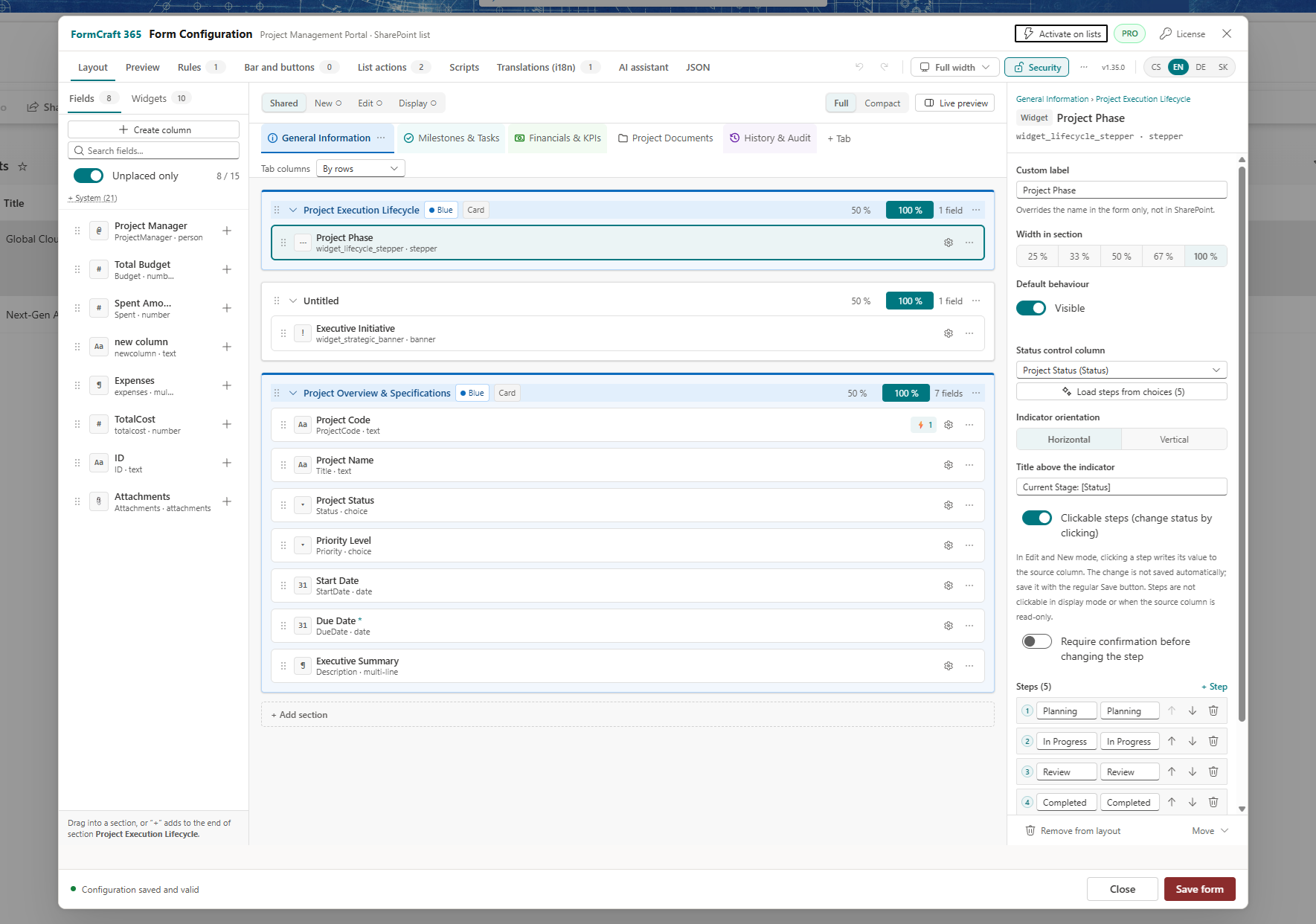
Visual drag-and-drop designer
Drag fields and widgets from the palette into sections on a 12-column grid. Separate layouts for New, Edit and Display share one configuration.
- Create SharePoint columns straight from the palette (requires Manage Lists)
- Undo and Redo with
Ctrl+Z/Ctrl+Y - Live preview, tabs, collapsible sections, width presets from 25% to 100%
- Configuration warnings, revision history and a conflict dialog for concurrent edits
- Raw JSON tab for import, export and review
Rules engine
No-code WHEN / THEN rules with all match or at least one matches. Conditions can test field values or the signed-in user's SharePoint group membership.
alwaysonLoadonSaveActions show or hide elements, lock fields, compute values, block saving or call a script function. Loop protection stops rules that overwrite each other after 10 writes to a field within one second.
Safe expressions
Formulas are evaluated by a custom parser. It does not use eval or new Function and cannot reach window or fetch, so expressions work even when custom scripts are disabled.
[Price] * [Quantity]
DATEDIFF([DueDate], @Today)
CONCAT("Approved by ", @Me)
IF(ISBLANK([Budget]), 0, ROUND([Spent] / [Budget] * 100))
Process and relational widgets
Widgets are form elements that are not list columns. They display information, control the form or show data from another list.
Related Items
1:N subgrid from another list. Columns render as badge, progress bar, due-date alert or person. Visual filter builder with AND/OR groups and Today tokens.
Related Documents
Documents from a library, mapped by folder or metadata. Upload, optional delete to the recycle bin, and a resizable hover preview.
Repeating Table
Repeating rows with typed columns and summaries, stored as JSON in a single item column. A sum can be written to another field.
Cascading Lookup PRO
A lookup that depends on a parent field. Changing the parent clears the dependent value.
Process Stepper
Workflow steps driven by a status column. Optionally clickable in Edit and New mode, with a confirmation prompt.
KPI
Progress bar or tile with color thresholds. The target can be a fixed number or another column.
Version History
Item versions and comments inside the form, with a choice of tracked columns.
Banner, Text Block, Image, Spacer
Layout and messaging elements. Text can include field values, @Me and @Today.
Custom form buttons
Place buttons in the form bar, the footer or inside the layout. Each can set values, compute an expression, submit the form or call a script function, with display conditions and a confirmation message.
List command bar and context menu
Add your own actions to the list toolbar and item menu.
openFormupdateItemtriggerFlowrunScriptprinttriggerFlow only accepts HTTPS Power Automate and Azure Logic Apps hosts.
Multilingual
Designer and forms in English, Czech, German and Slovak. Labels, buttons and dialog texts are translated on the Translations tab.
Display mode and print
A clean read-only view. Printing stacks all visible tabs vertically and expands collapsed sections; tabs hidden by rules are not printed.
AI Assistant
PROThe assistant does not call an AI service itself. It prepares a prompt for the chat you already use, then checks what comes back before anything touches the form.
- 1 · Describe
Write the request or pick a recipe. Modify the existing form or design a new one.
- 2 · Hand over
Download the prompt file and attach it in Copilot, ChatGPT or Claude. It contains column names, types and settings only.
- 3 · Check
Paste the response. Schema errors block applying; a summary shows before → after counts and large removals need confirmation.
- 4 · Create columns
Fields with no SharePoint column are listed. Create each one after confirming it; nothing is created automatically.
- 5 · Apply or undo
Applying is a single Undo step. The designer then switches to Preview.
FormCraft 365 vs. Microsoft Power Apps
The FormCraft 365 column reflects our product documentation. The Power Apps column is a general architectural summary.
| Feature | FormCraft 365 | Microsoft Power Apps |
|---|---|---|
| Load behavior | ✓ Native SPFx, renders directly inside the SharePoint page | Partial · a separate app player runtime loads first |
| Licensing model | ✓ Flat per site collection or tenant. Free Community edition | Partial · included for standard use; premium features are per user or per app |
| Data residency / zero-backend | ✓ Config in SiteAssets, offline license key, no vendor servers |
Partial · Microsoft cloud, but a separate Power Platform environment |
| Native Fluent UI / dark mode | ✓ Fluent v9, follows the site theme including dark mode | Partial · own theming, styled manually per app |
| Relational 1:N tables | ✓ Built-in Related Items, Related Documents & Repeating Table | Partial · built by hand with galleries and PowerFx formulas |
| Deployment / ALM | ✓ One .sppkg tenant-wide; one JSON config per list with history, import and export |
Partial · one app per list, moved across environments |
Migrating from legacy DFFS or InfoPath? FormCraft 365 runs directly on your existing SharePoint lists and columns, so your list data stays intact. Microsoft and Power Apps are trademarks of Microsoft Corporation.
Enterprise security and governance
FormCraft 365 is pure client-side SPFx. The browser talks to SharePoint Online as the signed-in user, and to nothing of ours.
signed-in user
deny by defaultNo third-party cloud.
The only outbound calls are ones you configure yourself, such as a triggerFlow action to your own Power Automate flow.
Storage Lock
Applied automatically on the first save by a site owner. Site owners keep Full Control; any higher role held by others is reduced to Read. If locking fails, the original inheritance is restored.
Who can design
By default only site owners (ManageWeb) can open the designer. Owners can extend it to one named SharePoint group. If the permission check fails, the user is treated as unauthorized.
Scripts are opt-in
Custom JavaScript does not run until a tenant administrator sets FormCraft365_ScriptsPolicy to allow. A missing value, a typo or a read error all mean scripts stay disabled.
Expressions without eval
Rules, formulas and button actions use a custom parser with access to field values only.
Offline license
The key's signature is verified in the browser. No external service is called, and a failed read never blocks a form.
Safe concurrent editing
Items save with ETag optimistic concurrency and a conflict dialog. Every configuration save gets a revision.
Flat pricing. No per-user fees.
Start free. License Pro by site collection or tenant when you need it.
Community
Unlimited lists and forms. Layout, fields, rules, expressions, widgets, display and print, SiteAssets storage. Up to 2 tabs and 3 rules per form.
Tenant License
Most popularPro features across unlimited sites in 1 Microsoft 365 tenant.
Start Pro trialCommunity vs. Pro
| Feature | Community | Pro |
|---|---|---|
| Tabs per form | 2 | Unlimited |
| Active rules per form | 3 | Unlimited |
| Cascading Lookup | — | ✓ |
| AI Assistant in the designer | — | ✓ |
| Editing custom scripts | — | ✓ |
| List command bar and context menu actions | 1 button | Up to 10 |
| “Powered by FormCraft 365” footer note | Shown | Hidden |
| Enterprise support | — | ✓ |
Get FormCraft 365
Community edition
Free, no key required. Deploy the .sppkg package to your SharePoint App Catalog.
- Upload the package to Apps for SharePoint in the App Catalog.
- Check Enable this app and add it to all sites.
- As a site owner, activate the custom form on a list and open the designer.
Request package or 30-day Pro trial
We reply by email with the package link or a 30-day Pro trial key for your tenant.
Frequently asked questions
How does licensing work?
A Pro license is an offline key issued for a tenant or a site collection. You paste it into the designer's License dialog. It is verified locally in the browser, with no call to any external service. There are no per-user or per-app fees.
What happens if my license expires?
The product falls back to Community. The designer shows the Community limits and the footer note returns. Running forms keep working with all their tabs, rules, cascading lookups and scripts, and saving is never blocked.
Which SharePoint permissions are required?
An App Catalog administrator deploys the package. A site owner activates the form on a list and designs it; owners can extend designer access to one SharePoint group. Creating columns from the designer needs Manage Lists. End users only need read access to the configuration, which the Storage Lock keeps in place.
Can I migrate from Power Apps, DFFS or InfoPath?
There is no automatic converter. FormCraft 365 sits on your existing lists and columns, so the data stays where it is and you rebuild the layout in the designer. With Pro, the AI Assistant's “Design a new form” mode can draft a form from the list's columns.
Are custom scripts a security risk?
Scripts are disabled by default and run only after a tenant administrator explicitly allows them. Rules and expressions do not depend on that setting: they use a parser without eval and keep working when scripts are off.
What is the difference between Community and Pro?
Community allows 2 tabs, 3 rules and 1 list action button per form and shows a small footer note. Pro removes those limits and adds Cascading Lookup, the AI Assistant, script editing and up to 10 list actions. See Pricing.