Professional SharePoint list forms in minutes — without Power Apps or per-user fees.
- Fast to build: visual drag-and-drop designer + AI Assistant for your existing lists
- 100% inside your tenant: zero external servers, approved faster by IT & Security
- One flat price: $990/year for your whole tenant — unlimited users and forms
What teams build with FormCraft 365
Customers think in business processes, not widgets. FormCraft 365 turns standard SharePoint lists into complete departmental apps.
Purchase Requests
Line-item repeating tables, automatic VAT & budget KPIs, cascading categories, approval stepper, and linked offer PDFs.
Contract Approvals
Multi-tab review layout, related approval tasks across sites, hover document preview, and full version audit trail.
Employee Onboarding
Conditional sections per role and department, IT equipment checklist, and one-click Power Automate provisioning.
IT Incidents & Requests
Dynamic priority banners, SLA countdowns, list view status badges, and instant modal form opening from the list.
Video walkthroughs
Watch how forms are built, automated, and published directly inside SharePoint Online.
See it in SharePoint
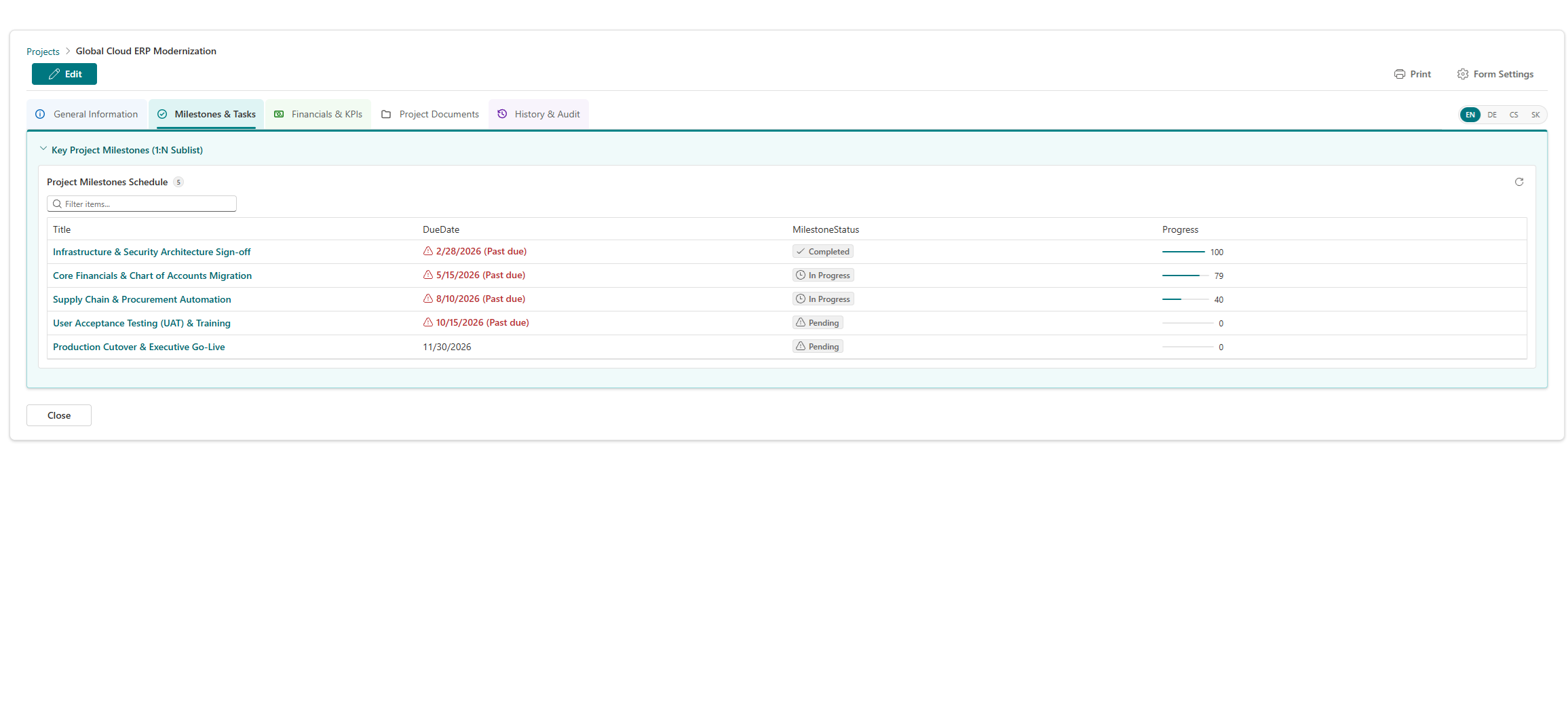
Built by a Microsoft 365 practitioner
FormCraft 365 is an independent product built in Prague (EU) by a Microsoft 365 & SharePoint architect with over 15 years of enterprise intranet, workflow, and forms experience.
“Our InfoSec team approved FormCraft 365 in one meeting because nothing leaves our tenant — no external backend, no user data in third-party clouds.”
“We replaced our legacy InfoPath purchase request forms over a single weekend. The repeating table and approval stepper gave users an immediate upgrade.”
“One flat tenant license and native SPFx speed made it effortless to roll out consistent HR, IT, and procurement forms across all our sites.”
Everything you need for SharePoint forms
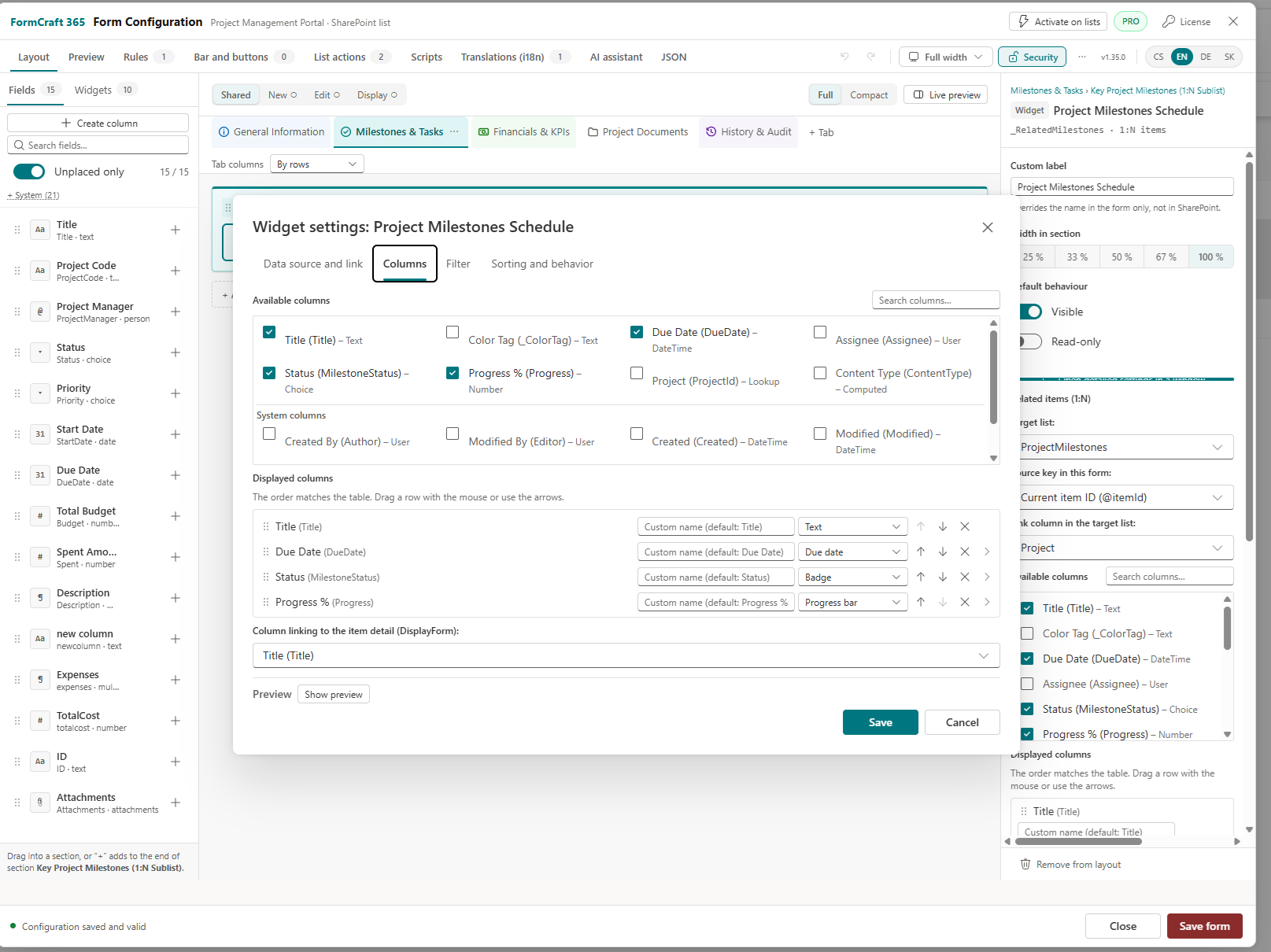
Configured visually in SharePoint and saved inside your own site library — no external database or separate app player.
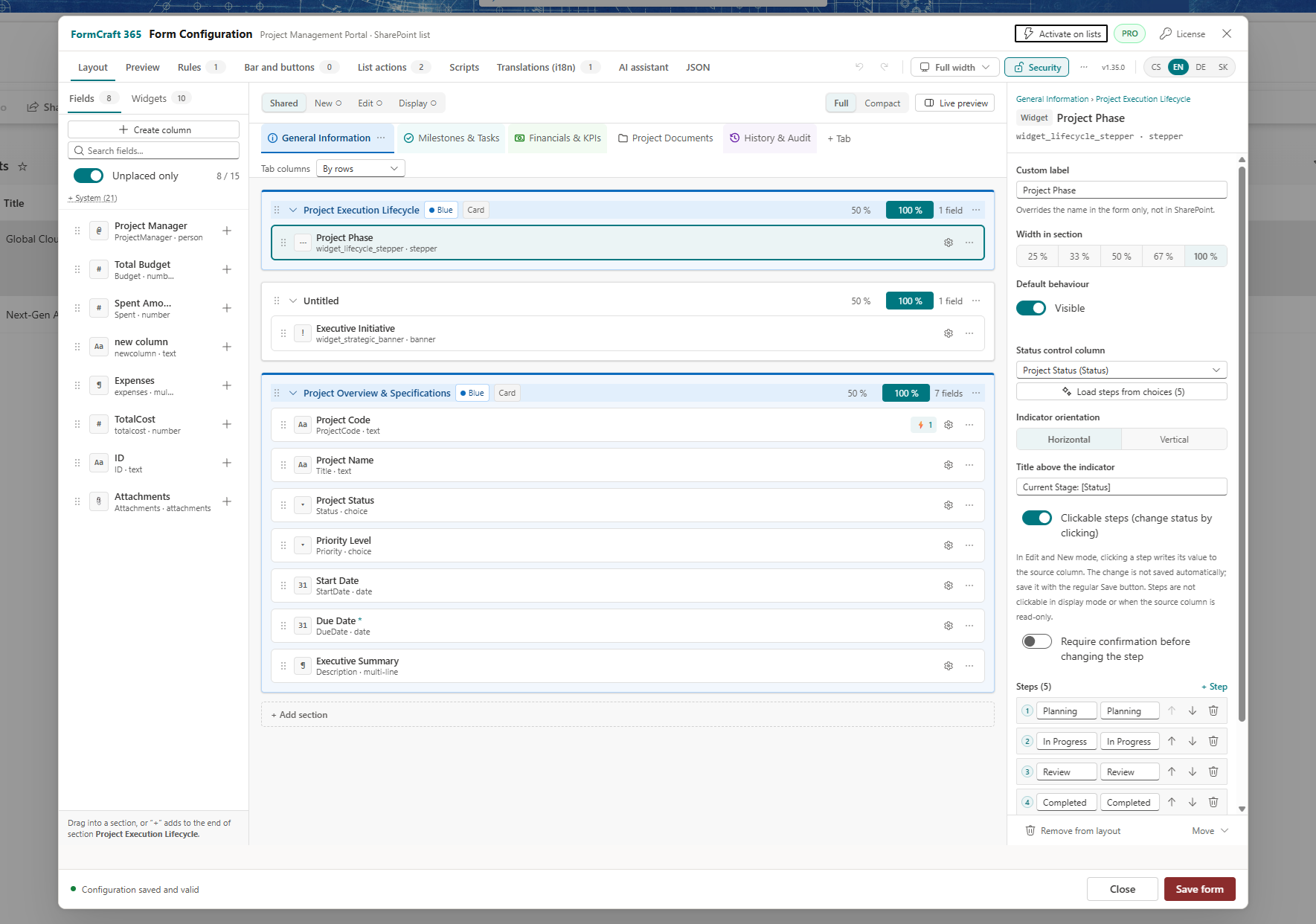
Visual drag-and-drop designer
Drag fields and widgets into sections on a 12-column grid. Separate layouts for New, Edit and Display share one configuration.
- Create SharePoint columns straight from the palette
- Undo and Redo with
Ctrl+Z/Ctrl+Y - Live preview, tabs, collapsible sections, width presets from 25% to 100%
- Configuration health checks, revision history, and conflict detection on concurrent edits
- JSON import/export for backup and moving forms between environments
Advanced Rules Engine
No-code WHEN / THEN rules with nested condition groups (AND / OR) and SharePoint group membership checks.
alwaysonLoadonSaveShow/hide elements, lock fields, compute values, show user warnings, ask for confirmation with automatic value revert on cancel, or block saving — with built-in loop protection.
Safe expressions
Formulas run in a sandboxed expression engine without eval, so dynamic calculations work reliably even when custom scripts are turned off.
[Price] * [Quantity]
DATEDIFF([DueDate], @Today)
CONCAT("Approved by ", @Me)
IF(ISBLANK([Budget]), 0, ROUND([Spent] / [Budget] * 100))
Process, relational & list-view features
Everything included in v1.39 — from cross-site relations to list view column formatting.
AI Assistant
PROWorks with the AI chat your company already approves (Microsoft 365 Copilot, ChatGPT, or Claude). Shares column structure only — never item data — and validates every change before applying.
- 1 · Describe
Write what you need or pick a recipe. Modify an existing form or draft a brand-new one.
- 2 · Hand over
Copy or download the prompt (column names & types only) into Copilot, ChatGPT, or Claude.
- 3 · Check
Paste the response. Schema checks block errors and show a clear before → after summary.
- 4 · Create columns
Missing SharePoint columns are listed for one-click creation after your confirmation.
- 5 · Apply or undo
Applied as a single Undo step, switching straight to Live Preview.
Migrating from InfoPath or DFFS
InfoPath is retired. FormCraft 365 gives SharePoint teams a direct, modern replacement that runs on your existing lists and columns — with zero data migration.
Microsoft InfoPath Official Retirement Dates
- May 18, 2026: Microsoft blocked publishing new or updated InfoPath forms to SharePoint Online.
- July 14, 2026: InfoPath 2013 reached official end of extended support, and InfoPath Forms Services were retired from SharePoint Online.
Source: Microsoft Lifecycle Policy & Microsoft 365 Message Center. Verified Nov 2026.
Keep 100% of your list data
FormCraft 365 attaches directly to your existing SharePoint lists and columns. Historical items, permissions, and Power Automate flows keep working without exporting or transforming data.
Replace DFFS tabs, rules & cascades
Everything DFFS users rely on — tabbed layouts, conditional visibility/required rules, cascading lookups, repeating tables, and SharePoint group checks — is built natively in modern Fluent UI v9.
Draft forms in minutes with AI
While there is no 1:1 XML converter for InfoPath templates, our AI Assistant reads your existing SharePoint columns and generates a complete modern form layout in seconds.
FormCraft 365 vs. Microsoft Power Apps
An honest comparison with Microsoft Power Apps so you can pick the right tool for your use case.
| Capability | FormCraft 365 | Microsoft Power Apps |
|---|---|---|
| Load experience | ✓ Native SPFx, renders directly inside the SharePoint page | Separate app player loads inside iframe |
| Pricing model | ✓ Flat $990/yr tenant or $390/yr site. Free Community | Standard SharePoint forms included; Premium connectors are per user or per app |
| Data residency | ✓ 100% in your SharePoint site, zero vendor servers | Power Platform cloud environment |
| 1:N tables & documents | ✓ Built-in Related Items, Related Docs (cross-site) & Repeating Table | Built manually via galleries & PowerFx |
| 1,000+ external connectors & mobile canvas apps | SharePoint-focused (calls Power Automate via triggerFlow) |
✓ Native mobile app, Dataverse, SQL, SAP & 1,000+ connectors |
Choose FormCraft 365 when…
- Your data lives in SharePoint Online lists and document libraries.
- You want fast, native SharePoint UI with flat predictable pricing.
- Security requires zero third-party servers and zero external data transfer.
- You want built-in 1:N subgrids, document hover previews, and repeating tables without formulas.
Choose Power Apps when…
- You need a standalone iOS/Android mobile app with offline sync.
- Your app connects directly to Dataverse, Azure SQL, SAP, or ERP systems.
- You are building a custom multi-screen canvas app outside SharePoint lists.
Microsoft, SharePoint, and Power Apps are trademarks of Microsoft Corporation.
Enterprise security and governance
FormCraft 365 runs 100% inside your Microsoft 365 tenant. The browser talks only to SharePoint Online as the signed-in user — never to FormCraft servers.
signed-in user
No third-party cloud.
Automatic Storage Lock
Applied on first save so only site owners can modify form definitions, while end users retain read-only access.
Role-based designer access
Only site owners can open the designer by default, with an option to delegate to one named SharePoint group.
Scripts are opt-in
Custom JavaScript is off by default and stays disabled until explicitly enabled by your tenant administrator.
Sandboxed expressions
Rules, formulas, and button actions use a safe parser without eval, with built-in rule loop protection.
Offline license check
Verified locally in the browser with zero external network calls.
Safe concurrent editing
Prevents accidental overwrites with conflict detection and keeps full configuration revision history.
Flat pricing. No per-user fees.
Start free with Community. Paid plans are annual subscriptions including all Pro features, updates, and email support.
Community
Up to 2 lists per site. Layout, fields, rules, expressions, widgets, display and print. Up to 2 tabs and 3 rules per form.
DownloadSite License
All Pro features for 1 SharePoint site collection (unlimited users and lists on that site).
Start Pro trialTenant License
Most popularAll Pro features across unlimited sites and unlimited users in 1 Microsoft 365 tenant.
Start Pro trialEnterprise
Covers multiple separate M365 tenants (e.g. subsidiaries, dev/test/prod), priority SLA, and guided onboarding.
Contact usPartner
For M365 consultancies & integrators: includes internal/demo NFR license plus partner margin on client licenses.
Contact usCommunity vs. Pro
| Feature | Community | Pro |
|---|---|---|
| Lists per site | 2 | Unlimited |
| Tabs per form | 2 | Unlimited |
| Active rules per form | 3 | Unlimited |
| Cascading Lookup | — | ✓ |
| AI Assistant in the designer | — | ✓ |
| Editing custom scripts | — | ✓ |
| List command bar and context menu actions | 1 button | Up to 10 |
| “Powered by FormCraft 365” footer note | Shown | Hidden |
| Support | Docs & community | ✓ Email support (1 business day; priority SLA in Enterprise) |
Get FormCraft 365
Community edition
Free, no key required. Deploy the .sppkg package to your SharePoint App Catalog in 3 steps:
- Upload the package to Apps for SharePoint in the App Catalog.
- Check Enable this app and add it to all sites.
- As a site owner, activate the custom form on a list and open the designer.
Request 30-day Pro trial, package, or live demo
We reply by email within 1 business day with your 30-day Pro trial key, .sppkg download link, or calendar slots for a 30-minute walkthrough.
Frequently asked questions
How does licensing work?
A Pro license is an offline key issued for a tenant or a site collection. You paste it into the designer's License dialog. It is verified locally in the browser, with no call to any external service. There are no per-user or per-app fees.
What happens if my license expires?
The product falls back to Community. The designer shows the Community limits and the footer note returns. Running forms keep working with all their tabs, rules, cascading lookups and scripts, and saving is never blocked.
Which SharePoint permissions are required?
An App Catalog administrator deploys the package. A site owner activates the form on a list and designs it; owners can extend designer access to one SharePoint group. Creating columns from the designer needs Manage Lists. End users only need read access to the configuration.
Can I migrate from Power Apps, DFFS or InfoPath?
FormCraft 365 sits directly on your existing SharePoint lists and columns, so your data stays intact. With Pro, the AI Assistant's “Design a new form” mode can draft a form from the list's columns in seconds. See InfoPath / DFFS migration.
Are custom scripts a security risk?
Scripts are disabled by default and run only after a tenant administrator explicitly allows them. Rules and expressions do not depend on that setting: they use a sandboxed parser without eval and keep working when scripts are off.
How do I get a new version of FormCraft 365?
FormCraft 365 never auto-updates from external servers — your tenant administrator controls every release. When a new version is announced in the Changelog, upload the updated .sppkg package to Apps for SharePoint in your App Catalog and choose Replace. Existing form configurations and your license key stay intact.